

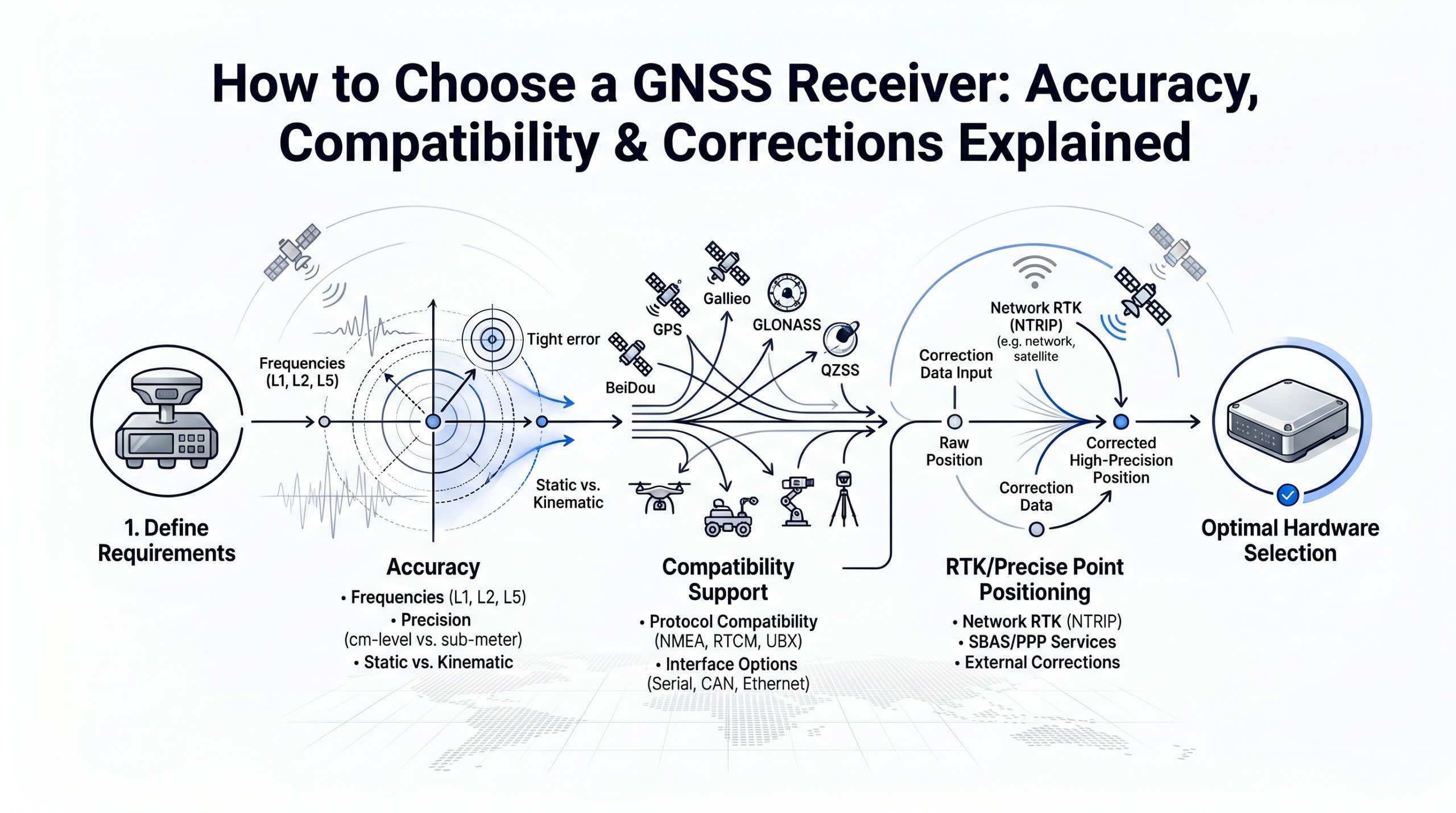
How to choose a GNSS receiver comes down to matching three things: frequency bands, correction source, and your real-world use case. A GNSS receiver is the hardware that captures satellite signals and computes your position. An RTK-capable GNSS receiver goes further: it accepts real-time correction data (typically in RTCM 3.x format via the NTRIP protocol) to achieve centimeter-level accuracy instead of the meter-level positions that standalone GPS delivers. This guide walks through how to choose a GNSS receiver that fits your accuracy needs and budget.
Estimated reading time: 9 minutes
- Frequency bands matter most: dual-frequency (L1/L2) is the minimum for reliable centimeter-level RTK.
- Constellation support (GPS + GLONASS + Galileo + BeiDou) improves satellite availability by 2-3x over GPS alone.
- RTCM 3.x input and NTRIP support are non-negotiable if you want to use network corrections instead of your own base station.
- The receiver is only half the equation. Your correction source (your own base station or a cloud NTRIP service) determines whether you actually reach the accuracy your hardware is capable of.
- Total cost of ownership includes the correction subscription, not just the receiver price tag.
What Makes a GNSS Receiver "RTK-Capable"?
Before getting into how to choose a GNSS receiver for your project, you need to know what separates an RTK-capable receiver from a regular GPS module. Not every GPS module can deliver centimeter accuracy. The term "RTK-capable" means the receiver meets three technical requirements:
1. Carrier-phase tracking. Standard GPS receivers measure the travel time of satellite signals (code-based positioning). RTK receivers go deeper: they track the phase of the carrier wave itself. This is what makes millimeter-level measurement resolution possible, which the RTK algorithm then refines into centimeter-level positions.
2. RTCM 3.x correction input. The receiver must accept correction data from an external source. The industry standard format is RTCM 3.2 (or 3.3), streamed in real time. If a receiver cannot parse RTCM messages, it cannot perform network RTK, regardless of how many frequencies it tracks.
3. An RTK engine (on-board or external). The correction data and raw observations need processing. Most modern receivers include an on-board RTK engine that computes the corrected position internally. Some lower-cost modules output raw observations for processing on an external computer or flight controller.
There is an important distinction between three tiers of GNSS receivers:
| Tier | Example | Typical Accuracy | Correction Input |
|---|---|---|---|
| Consumer GPS | Smartphone, handheld navigator | 2-5 m | None or SBAS |
| SBAS-augmented | WAAS/EGNOS-enabled receivers | 0.5-1 m | Satellite-based, free |
| RTK-capable | u-blox ZED-F9P, Emlid Reach, Septentrio mosaic | 1-2 cm horizontal | RTCM 3.x via NTRIP |
The jump from meter-level to centimeter-level is not incremental. It requires fundamentally different hardware and a real-time correction source.
GNSS Accuracy Tiers: From Meter-Level to Centimeter-Level
Receiver accuracy depends on two factors: the hardware's frequency capability and the quality of corrections applied. Here is what each class actually delivers in practice.
| Receiver Class | Frequencies | RTK Accuracy (Horizontal) | Initialization Time | Typical Module Cost |
|---|---|---|---|---|
| Single-frequency (L1) | L1 only | 2-5 cm (ideal conditions) | 60-120 seconds | $50-$150 |
| Dual-frequency (L1/L2) | L1 + L2 | 1-2 cm | 10-30 seconds | $150-$500 |
| Triple-frequency (L1/L2/L5) | L1 + L2 + L5 | <1 cm (optimal) | 5-15 seconds | $500-$2,000+ |
| Survey-grade (integrated) | L1/L2/L5 + tilt compensation | 8 mm + tilt | <10 seconds | $5,000-$25,000 |
Why dual-frequency is the practical minimum for RTK. Single-frequency receivers can achieve centimeter accuracy, but only under ideal conditions: clear sky, short baseline to the base station, and no signal interruptions. The moment conditions degrade (urban canyons, tree canopy, longer baselines), single-frequency RTK struggles to resolve the integer ambiguity and loses its fix. Dual-frequency receivers resolve ambiguities faster and maintain fix more reliably because the second frequency allows the receiver to model ionospheric delay directly.
The introduction of the u-blox ZED-F9P in 2019 was a turning point. It brought dual-frequency, multi-constellation RTK to a module price under $200, making centimeter accuracy accessible outside the traditional surveying market (u-blox ZED-F9P Product Summary). Before the F9P, comparable capability required modules costing $2,000 or more.
Adding a third frequency (L5) further improves performance, particularly for initialization speed and robustness against interference. However, for most field applications, dual-frequency delivers the accuracy needed at a fraction of the cost.
The 5 GNSS Receiver Specs That Actually Matter
Receiver datasheets list dozens of specifications. When figuring out how to choose a GNSS receiver, these are the ones that directly affect your RTK performance and workflow.
Constellation Support
Modern GNSS means more than GPS. Four global constellations are operational: GPS (US), GLONASS (Russia), Galileo (EU), and BeiDou (China). A receiver that tracks all four constellations sees 2-3 times more satellites than a GPS-only device. According to the European Space Agency's Galileo performance reports, multi-constellation tracking improves position availability by up to 30% in obstructed environments such as urban areas or forest canopy (ESA Constellation Information).
Minimum recommendation: GPS + Galileo + GLONASS. Preferred: all four plus SBAS (WAAS/EGNOS).
Update Rate
How often the receiver outputs a position. Common options:
- 1 Hz (1 update/sec): Sufficient for static surveying, agriculture auto-steer, and most mapping.
- 5-10 Hz: Recommended for drone mapping and moving vehicles.
- 20 Hz: Required for high-speed applications like autonomous vehicle testing or racing (see the PWR Racing Team's RT16e for a real-world example at 20 Hz).
RTCM 3.x and NTRIP Support
This is the compatibility checkpoint. If you plan to use any network correction service (rather than your own physical base station), confirm two things:
- The receiver accepts RTCM 3.2 or 3.3 correction messages as input.
- The receiver (or its connected device) can establish an NTRIP client connection to stream corrections over the internet.
Many integrated GNSS rovers handle NTRIP natively via built-in cellular modems. Board-level modules like the u-blox F9P require an external device (phone, tablet, or single-board computer) to handle the NTRIP connection. Both approaches work. For a deeper explanation of the protocol, see our NTRIP documentation.
Communication Interfaces
Consider how the receiver connects to your workflow:
- Serial (UART/RS232): Standard for embedded and machine-control applications.
- USB: Common for laptop-based field work.
- Bluetooth: Convenient for tablet/phone-based surveying with apps like SW Maps or FieldGenius.
- Ethernet/Cellular: Found on higher-end rovers for direct NTRIP streaming without a phone.
Antenna: Built-in vs. External
This specification is often overlooked, but antenna quality has a direct effect on RTK performance. Integrated antennas on compact boards are convenient for prototyping. For field work requiring reliable fix in all conditions, an external survey-grade antenna with a proper ground plane is strongly recommended.
Which RTK Correction Service Should You Use? Cloud NTRIP vs. Base Station
Here is a fact that receiver marketing rarely emphasizes: deciding how to choose a GNSS receiver is only half the picture. A $20,000 survey-grade receiver without corrections delivers the same meter-level accuracy as a $50 consumer GPS module. The receiver determines your accuracy ceiling. The correction source determines whether you reach it.
Four correction methods exist. Three of them are edge-case answers. One is the default choice for the overwhelming majority of teams.
| Method | Accuracy | Time to Fix | Coverage | Setup | Ongoing Cost | Verdict |
|---|---|---|---|---|---|---|
| Cloud NTRIP service | 1-2 cm | < 10 sec | Global, 140+ countries | Minutes | From $32/month | Default choice for most teams |
| Own base station | 1-2 cm | < 5 sec (once set up) | 30 km radius | $5,000-$15,000 hardware + site survey | Low after setup | Only if you work a single fixed site every day |
| PPP | 3-10 cm | 15-30 min convergence | Global (satellite-delivered) | Low | Commercial subscription required | Long-baseline geodesy or offline work only |
| PPP-RTK | 2-5 cm | 1-5 min convergence | Regional-global | Low | Commercial subscription required | Compromise when neither RTK nor PPP fits |
Why Cloud NTRIP is the default for most teams
The math is straightforward when you compare Cloud NTRIP against the obvious alternative, your own base station, over three years of normal operation:
- Upfront cost: $0 vs. $5,000-$15,000 (receiver, antenna, radio, surveyed reference pillar).
- Time to first fix on a new site: minutes vs. a full day of hardware setup and a static survey for the reference point.
- Site flexibility: works the same in Munich, Lagos, or rural Texas. A base station works only within ~30 km of where it was set up.
- Operational overhead: zero. Your team carries no extra hardware, no batteries, no LTE modem for the base, no insurance against theft on remote job sites.
- Accuracy: identical when you are inside the cloud provider's coverage area. Both deliver 1-2 cm horizontal on a properly configured RTCM 3.2 stream.
This is why RTKdata and similar cloud NTRIP providers have become the standard for surveying firms, drone service operators, agritech companies, and robotics teams that work across multiple sites. RTKdata's network covers 140+ countries through 20,000+ reference stations, with sub-second latency on any NTRIP-compatible receiver. Subscriptions start at $32 per month and include a 30-day free trial so you can verify performance at your actual work site before committing.
When the other methods are the right answer
Cloud NTRIP is not the answer in every scenario. The honest edge cases:
- Own base station wins when you operate at one fixed site, day in and day out, with no need to move (large mining operations, fixed agricultural research stations, dedicated test tracks). The amortized cost over years can drop below subscription pricing.
- PPP is the right choice for long-baseline geodesy, offshore work, or any application where you have no internet connectivity at all but can wait minutes for convergence.
- PPP-RTK is a niche compromise. If you need global coverage, cannot tolerate the convergence time of pure PPP, and cannot rely on terrestrial RTK network density, it sits in the middle.
If your team moves between sites, ships products with embedded GNSS, or runs operations across more than one country, Cloud NTRIP is the simpler answer.
Which GNSS Receiver Fits Your Use Case? A Quick Decision Matrix
Theory is useful. Practical decision-making is better. Here is how to choose a GNSS receiver class and correction method for the most common applications.
| Use Case | Recommended Receiver Class | Correction Method | Key Requirement |
|---|---|---|---|
| Land surveying | Dual- or triple-freq, survey-grade | Cloud NTRIP or local base | Legal accuracy specs, tilt compensation |
| Drone mapping | Dual-freq compact module | Cloud NTRIP | Light weight, fast initialization |
| Precision agriculture | Dual-freq with CAN/ISOBUS | Cloud NTRIP | Field-wide coverage, auto-steer integration |
| Construction machine control | Dual-freq ruggedized | Cloud NTRIP or local base | Vibration tolerance, multiple machines per site |
| Autonomous robotics / AV | Dual-freq module (F9P class) | Cloud NTRIP API | Always-on, low latency, API integration |
Real-world examples
When ADVOLARE SkyView needed centimeter-accurate drone surveying in the Swiss Alps, receiver choice was only part of the equation. The alpine terrain made base station placement impractical, so they paired their dual-frequency drone receiver with cloud-based RTK corrections from RTKdata to maintain fix even in narrow valleys.
In a very different environment, AeroAg Drone Services in South Dakota switched their agricultural drone mapping workflow from PPK post-processing to real-time NTRIP corrections. The result: a 10-minute setup reduction per flight mission, with rock and weed detection maps delivered same-day instead of next-day.
Both cases illustrate the same principle: the correction source shapes your workflow as much as the receiver hardware does.
5 Common Mistakes When Buying a GNSS Receiver
After supporting thousands of receiver setups across our correction network, certain patterns emerge. These are the mistakes we see most often when teams figure out how to choose a GNSS receiver for their workflow.
1. Buying a single-frequency receiver for professional RTK work.
Single-frequency modules cost less, but the cost savings evaporate when you spend extra time waiting for fix, re-initializing after signal loss, or repeating measurements that did not converge. For any application where accuracy and uptime matter, dual-frequency is the baseline.
2. Assuming every receiver supports NTRIP natively.
Board-level modules (like the u-blox F9P) accept RTCM corrections, but they do not connect to the internet on their own. You need an NTRIP client running on a connected device: a phone, tablet, Raspberry Pi, or the receiver's companion app. Before purchasing, verify whether the receiver has a built-in NTRIP client or whether you need to provide one.
3. Ignoring antenna quality.
A dual-frequency receiver connected to a poor antenna will underperform a well-designed single-frequency setup with a quality antenna. The antenna is the sensor. Invest in a multi-band antenna with a ground plane for any field application. Patch antennas on development boards are fine for bench testing, not for production work.
4. Overlooking correction costs in total cost of ownership.
A receiver module at $200 looks inexpensive. Add a $12,000 base station and the picture changes. Alternatively, a cloud NTRIP subscription at $40/month over three years totals $1,440: a fraction of base station hardware. Calculate total cost of ownership for your expected usage period before deciding on a correction strategy.
"The question we get asked most often is: 'Will my receiver work with your service?' In almost every case, the answer is yes, as long as it accepts RTCM 3.x corrections via NTRIP. That is the universal compatibility layer. The receiver brand does not matter."
— Konstantin Nidens, CEO & Co-Founder, RTKdata
5. Locking into a proprietary ecosystem.
Some manufacturers bundle receivers with their own correction service and make it difficult (or impossible) to use third-party corrections. Before purchasing, confirm that the receiver allows you to configure a custom NTRIP caster address. Hardware-agnostic receivers give you the freedom to switch correction providers or use multiple sources.
GNSS Receiver FAQ: Accuracy, Cost, Compatibility
Do I need a dual-frequency receiver for centimeter accuracy?
For reliable, repeatable centimeter accuracy in real-world conditions: yes. Single-frequency receivers can reach centimeter-level under ideal circumstances (clear sky, short baseline, no interruptions), but they lose fix more easily and take longer to re-initialize. Dual-frequency receivers model ionospheric errors directly, which makes the RTK solution more robust across varying environments and baselines up to 30-50 km.
Can I use any GNSS receiver with an NTRIP correction service?
Any receiver that accepts RTCM 3.x correction messages and supports an NTRIP client connection will work with a standard NTRIP correction service like RTKdata. This includes receivers from Emlid, u-blox, Septentrio, Hemisphere, and many others. The only requirement is that you can configure the NTRIP server address, port, mountpoint, and credentials on the receiver or its companion software.
What is the difference between RTK and PPK?
RTK (Real-Time Kinematic) applies corrections in the field, giving you centimeter accuracy at the moment of measurement. PPK (Post-Processed Kinematic) logs raw satellite data and applies corrections after returning to the office. RTK is essential for applications that need real-time positioning (auto-steer, machine control, live drone navigation). PPK is useful for photogrammetry workflows where real-time accuracy is not required. Some receivers and workflows support both modes.
How much does an RTK-capable GNSS receiver cost in 2026?
The range is wide. Board-level modules like the u-blox ZED-F9P start under $200. Integrated rover kits (Emlid Reach RS3, for example) with built-in antenna, battery, and cellular modem cost $2,500-$6,000. Survey-grade receivers with tilt compensation (Trimble R12i, Leica GS18 T) range from $10,000-$25,000. For many non-surveying applications, a dual-frequency module at the $200-$500 price point delivers the accuracy needed.
Do I need a separate antenna or is a built-in antenna enough?
For prototyping and bench testing, a built-in patch antenna is sufficient. For any field deployment requiring reliable RTK fix, an external multi-band GNSS antenna with a ground plane is strongly recommended. The antenna directly affects signal quality, multipath rejection, and time-to-fix. Budget $80-$400 for a quality external antenna.
How do I know if my area has NTRIP correction coverage?
Cloud NTRIP providers publish coverage maps showing their reference station network. RTKdata, for example, operates 20,000+ base stations in 140+ countries. You can check coverage for your specific location on the RTKdata coverage map before subscribing. Most providers also offer free trial periods so you can verify performance at your actual work site.
Your GNSS Receiver Decision Checklist
Before purchasing, work through this checklist on how to choose a GNSS receiver that fits your operating reality:
- Accuracy requirement defined? Know whether you need meter, decimeter, or centimeter accuracy. This determines receiver class.
- Dual-frequency minimum? If centimeter accuracy is the goal, confirm L1/L2 support.
- Multi-constellation? GPS + Galileo + GLONASS at minimum. All four constellations preferred.
- RTCM 3.x input confirmed? Check the datasheet. No RTCM input means no network RTK.
- NTRIP client available? Either built into the receiver or provided via companion app/device.
- Correction source decided? Own base station or cloud NTRIP. Factor the cost into TCO.
- Antenna quality matched to application? External antenna for field work, patch antenna only for prototyping.
- Update rate sufficient? 1 Hz for static work, 5-10 Hz for drones and vehicles, 20 Hz for high-speed applications.
- Not locked into a proprietary ecosystem? Confirm you can configure custom NTRIP server settings.