

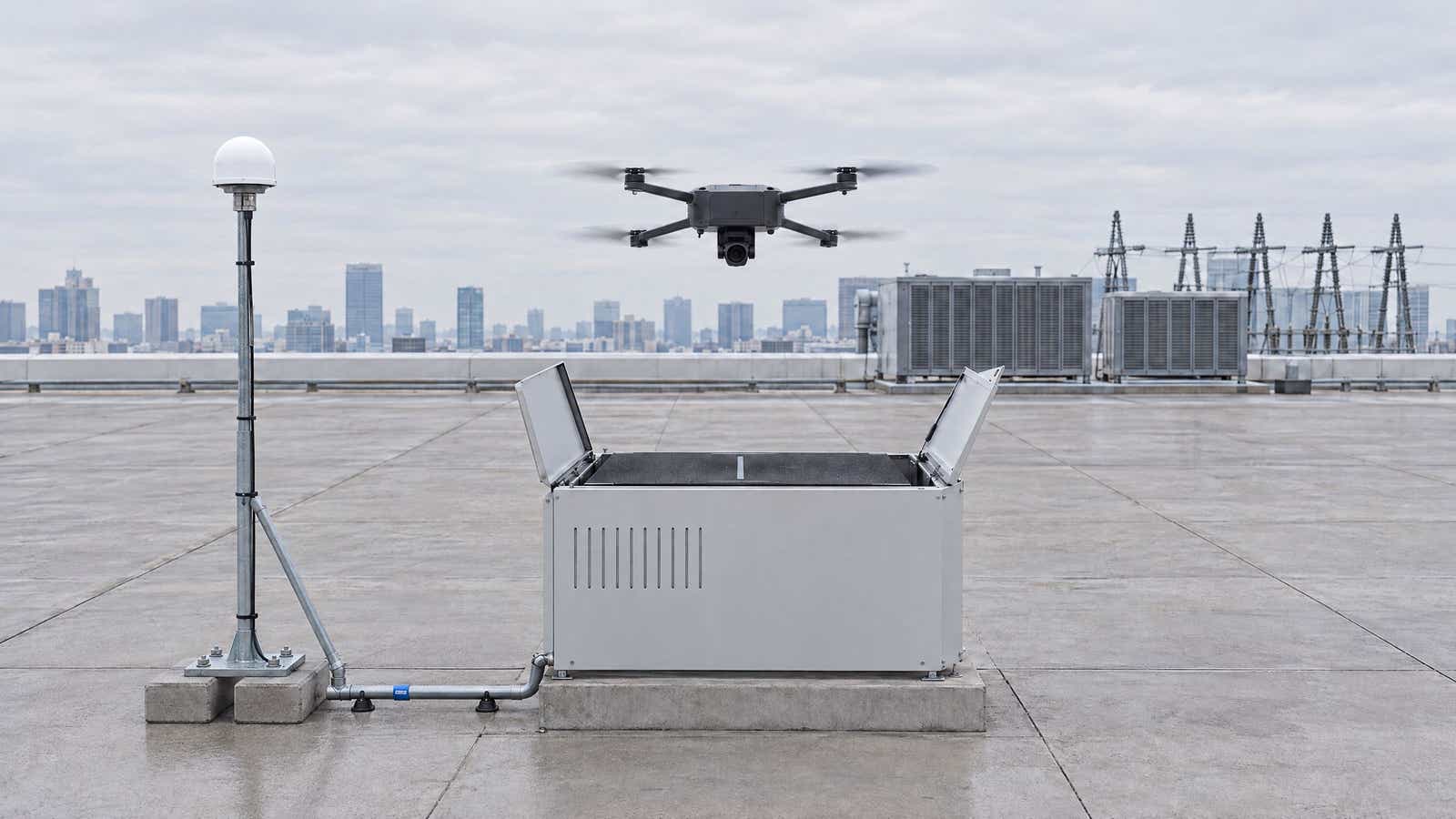
TL;DR DJI Dock 4 RTK runs through the O4 Ground Station, which Dock 4 requires. It is the RTK base for the dock, so the Matrice 5TD's integrated RTK module takes its corrections from that station over DJI's link, on site, not from the internet. For DJI Dock 4, network RTK matters at three points. It matters when you calibrate the station's absolute position and when you build the site model you draw your routes on (for example with a Matrice 4E). It also matters because DJI requires routes to use the same RTK source as the calibration. DJI also measured its 10 cm mapping figure with an O4 calibrated via custom network RTK.
DJI announced Dock 4 and the Matrice 5TD on 14 October 2026. The headline is a battery swap in under 25 seconds, but the part that decides where your missions actually fly is quieter. The RTK base is a separate O4 Ground Station that sits apart from the dock. This guide covers what is new, how DJI Dock 4 RTK works, why a dock leans on it so heavily, and where a network RTK service such as ours fits, step by step.
What's New in DJI Dock 4 and Matrice 5TD
Dock 4 follows DJI Dock, Dock 2 and Dock 3, and it is a closed system. DJI's FAQ states that "DJI Dock 4 is compatible only with DJI Matrice 5TD", and that the dock "must be used with the O4 Ground Station" (DJI's Dock 4 FAQ, retrieved October 2026). The user manual also lists the whole system as the Matrice 5TD, Dock 4, the ground station, the DJI Enterprise App and DJI FlightHub 2. There is no remote controller in it. Instead, the aircraft lives in the dock.
The upgrades DJI highlights:
- Battery swapping. The dock swaps the aircraft battery itself. Its operational turnaround, from landing to the next takeoff, is under 45 seconds.
- Wider temperature range. DJI rates both the dock and the aircraft from -40 to 50 °C.
- A required ground station. On DJI Dock 4, video transmission, the RTK base and the network connection sit in the ground station. You can mount it higher than the dock, less than 80 m of cable away. The O4 Ground Station itself is not new: DJI's O4 Ground Station FAQ lists it working with Dock 3. What is new is that Dock 4 cannot run without it.
- More sensing on the aircraft. Compared with the Matrice 4TD, the Matrice 5TD adds LiDAR, millimetre-wave radar and built-in dual 4G modules. It also raises the thermal camera's resolution from 640 × 512 to 1280 × 1024 and extends onboard AI detection to 17 object types.
Key Specifications
| Specification | DJI figure |
|---|---|
| Battery swap time | < 25 s |
| Operational turnaround time | < 45 s |
| Max flight time (Matrice 5TD) | 59 minutes |
| Max operating radius | 10 km |
| Dock RTK base station | Supported via DJI O4 Ground Station |
| Aircraft RTK module | Integrated on the aircraft |
| Ingress protection | Dock IP56, aircraft IP55, O4 Ground Station IP67 |
All figures come from DJI's Dock 4 specifications (retrieved October 2026).
How DJI Dock 4 RTK Works with the Matrice 5TD
RTK, real-time kinematic positioning, corrects a GNSS receiver with data from a reference receiver at a known position. That correction takes the result from metres to centimetres. On Dock 4 both ends of that link are DJI hardware on your site:
- The rover is the Matrice 5TD. The aircraft has an integrated RTK module, and its GNSS uses GPS, Galileo, BeiDou, QZSS and GLONASS.
- The O4 Ground Station acts as the base. DJI's FAQ describes its role as providing "video transmission, RTK base station functionality, network connectivity, data processing". It connects to the dock over one Ethernet cable that also powers it.
Where the Corrections Come From
The user manual puts it plainly: the ground station provides "the aircraft with a video link and RTK base station data". It also notes that with the dock and ground station "centimeter-level positioning data can be obtained" (Dock 4 user manual, retrieved October 2026). So in flight the corrections travel over DJI's own link from the station, not from an internet caster. A network RTK service touches the system only when you calibrate the station, at installation and after a move, and on the survey drone, as the diagram below shows.
How the Corrections Flow
RTK or GNSS for Each Task
In FlightHub 2, a DJI Dock 4 task's positioning accuracy is either High-Precision RTK or GNSS. With High-Precision RTK, the aircraft takes off and waits in the air until the RTK solution converges before it starts the task. With GNSS, it starts the task instead of waiting for RTK to converge (FlightHub 2 user guide, retrieved October 2026). The Dock 4 user manual adds that the aircraft should track more than 20 satellites during convergence, in an open area. For the background on bases and rovers, see our drone RTK setup guide.
Why DJI Dock 4 Depends on RTK
A pilot can correct a drifting aircraft by eye. DJI Dock 4 cannot, so it relies on its own positioning, and RTK is what makes that positioning centimetre-precise:
- Landing back on the dock. DJI's FAQ says the aircraft "first returns to the departure point using RTK positioning, then uses LiDAR and visual SLAM" and the visual markers on the landing pad to touch down.
- Low, tight routes. The Dock 4 user manual allows a return-to-home altitude as low as 2 m. But when the RTH or safe takeoff altitude is under 15 m, RTK is the only accuracy option a task accepts. With an RTH altitude under 15 m, the aircraft "cannot take off" unless RTK is in FIX. The FlightHub 2 user guide lists an RTH range of 20 to 1500 m for Dock 4. So check what your FlightHub 2 version allows before you plan a low route.
- Repeatable data. Inspections and change detection compare flights over weeks. So the same route has to put the camera in the same place each time.
Mapping Accuracy and the RTK Source
Mapping is where the RTK source shows up in DJI's own numbers. DJI states that the Matrice 5TD "achieves an aerial-triangulation checkpoint accuracy of 10 cm" at 120 m with 12 MP images. The test conditions read: "using an O4 Ground Station calibrated via custom network RTK" (DJI's Dock 4 FAQ, retrieved October 2026). In other words, DJI's published mapping result assumes a ground station whose position came from a third-party network RTK service.
Matrice 5TD RTK Accuracy: What DJI Publishes
DJI gives two different hover figures for RTK positioning. Neither is a positioning accuracy, because they describe how tightly the aircraft holds a hover. DJI's specifications also list no RTK fix accuracy for the Matrice 5TD. Here are both, with their source:
| Figure | Value | Source |
|---|---|---|
| Hover range with RTK (windless or breezy) | ±0.02 m horizontal, ±0.04 m vertical | DJI spec page |
| Hover and flight range with RTK (windless or breezy) | ±0.1 m horizontal, ±0.1 m vertical | DJI user manual, EU C6 class section |
| O4 Ground Station GNSS receiver, system accuracy | 1.0 cm (RMS) + 1 ppm horizontal, 3.0 cm (RMS) + 1 ppm vertical | DJI spec page |
| Aerial-triangulation checkpoint accuracy | 10 cm at 120 m, 12 MP | DJI FAQ |
These are DJI's figures for the aircraft and the station's receiver. Where the whole system sits on the map also depends on how you set the ground station's own coordinates. Our accuracy documentation splits coverage into two zones. In the 2 cm zone, RTK FIX is reliable and accuracy is survey-grade. In the 2 to 10 cm zone, horizontal positions "will typically be within 2 to 10 cm of true position". Vertical accuracy there is 1.5 to 2 times worse than horizontal.
When Matrice 5TD RTK Drops Mid-Flight
The manual says that with fixed RTK positioning, "the aircraft switches to GNSS if RTK becomes unavailable during flight." Until the fix returns, the aircraft positions with ordinary GNSS accuracy, so a route that relies on centimetre spacing loses it. Our article on fix, float and PDOP explains what those states mean for your data.
Calibrating the O4 Ground Station for DJI Dock 4 RTK
A base station is only useful if it knows exactly where it stands. DJI's O4 Ground Station manual requires a device location calibration "to acquire an accurate absolute position". It also offers three methods (DJI O4 Ground Station User Manual, retrieved October 2026):
- Network RTK calibration with the app's built-in network RTK service. The manual recommends using it with "a free Network RTK account … to achieve better accuracy and simplify operation".
- Custom network RTK calibration with a third-party NTRIP service. The manual's only instruction is to make sure the service provider, mount point and port settings are consistent.
- Manual calibration, typing in a known antenna phase centre position, recommended "only when Network RTK is unavailable".
DJI's Dock 4 documents do not say where its built-in network RTK works. An older DJI Mobile SDK reference (retrieved October 2026), written for the Phantom 4 RTK and Matrice 300 RTK, says DJI's default network RTK solution "can only be used in China". So ask your dealer whether it covers your region. Where it does not, custom network RTK still gives you an absolute position without a surveyed point.
The calibration "is valid for a long time" and survives restarts, but "re-calibration is required once the device is moved." So you need network RTK at installation and after any move, not for each mission.
Custom Network RTK Calibration Steps
The steps follow DJI's Dock 4 Installation and Setup Manual (pp. 60 to 61 and 73 to 75), which recommends network RTK calibration; the three calibration methods above come from the O4 Ground Station manual, written before Dock 4. They run in the DJI Enterprise App. Start after you mount and cable the station and bind it to your FlightHub 2 organization:
- Connect an Android smartphone (DJI's O4 Ground Station FAQ says the DJI Enterprise App requires one) to the ground station with a USB-C to USB-C cable. Then make sure the phone is online.
- Open the DJI Enterprise App, wait for GNSS positioning to converge, then start the position calibration.
- Choose custom network RTK and enter your NTRIP details. For RTKdata: the host for your region (rtk.rtkdata.com for North America, eu.rtkdata.com for Europe, aus.rtkdata.com for Australia), port 2101, a mountpoint in capitals such as AUTO, and the username and password from the RTK Credentials section of your dashboard.
- Until the app shows converged and calibrated, keep people and objects more than 5 m from the station or lower than its antenna.
- Before you leave, confirm that the station appears online in FlightHub 2 and that its GNSS indicator is normal.
The aircraft's position readout may jump after calibration, which DJI calls normal.
Mountpoint and Reference Frame
The connection values come from our Matrice 4 Enterprise RTK NTRIP guide. The mountpoint also fixes the reference frame. AUTO, the recommended mountpoint, delivers your regional datum, for example NAD83(2011) in the US, while AUTO_WGS84, AUTO_ITRF2020 and AUTO_ITRF2014 deliver global frames. NAD83 sits about 0.9 to 1.6 m horizontally from WGS84 and ITRF across the lower 48. So pick the mountpoint that matches your site plans and control.
One RTK Source for Survey, Routes and Dock
This is the rule that ties DJI Dock 4 RTK together. The O4 Ground Station manual (p. 41) says the ground station "and the dock used with it must be calibrated using the same RTK signal source", and both it and the Dock 4 user manual (pp. 47 to 48) say that routes imported through FlightHub 2 must use the same RTK signal source as the calibration. Otherwise, the O4 manual warns, "the actual flight path may deviate from the planned route, leading to unsatisfactory results or even a collision."
In practice that touches three jobs:
- Site evaluation. Before installation, DJI has you fly a Matrice 4 or Matrice 4D with an RC Plus 2 controller to the planned station position. There, DJI Pilot 2 checks the video link and GNSS signal. This is a signal check, and DJI does not tie it to network RTK.
- Mapping and route planning. You usually build routes on a map or model of the site. A Matrice 4E has its RTK module built in and can run custom network RTK in DJI Pilot 2. So that model, and every route you draw on it, sits in the coordinates of your network RTK source.
- Dock calibration. Calibrate the O4 Ground Station on the same service and mountpoint. Then the dock's missions line up with the coordinates you drew the routes in.
Why Mixing Sources Causes Offsets
Mixing sources is how a route drawn on one survey ends up offset when the dock flies it. In North America, the offset is about a metre or more if one source delivers NAD83 and the other WGS84 or ITRF. So keep one source, one mountpoint and one reference frame from survey to dock. If you are weighing a network against your own base, our comparison of owning an RTK base station covers the trade-offs.
One commercial detail: an RTKdata subscription covers "one device using the service at a time" (pricing, retrieved October 2026). If the calibration and a Matrice 4 survey flight run one after the other, one subscription covers both. Running them at the same time needs two.
Where You Can Buy DJI Dock 4
DJI's announcement says Dock 4 "will be available for purchase through" authorized DJI Enterprise dealers and gives no price (DJI announcement, retrieved October 2026). The specification sheet lists transmitter power for Canadian, European, Chinese and Japanese certification, with no FCC entry. DroneXL reports that Dock 4 and the Matrice 5TD have "no path to US sale". For the background, see our article on US drone rules and RTK.
FAQ
Does DJI Dock 4 have RTK?
Yes. The Matrice 5TD has an integrated RTK module, and the O4 Ground Station that Dock 4 requires is its RTK base. You calibrate that station's position at installation and after a move, with the app's built-in network RTK, a custom network RTK service or a manually entered point.
Can I use my own NTRIP or third-party network RTK with DJI Dock 4?
Yes, to calibrate the O4 Ground Station: its manual lists custom network RTK calibration with your provider's mount point and port. During flight, the Matrice 5TD takes corrections from the station. DJI's Dock 4 documents also describe no direct NTRIP feed to the aircraft.
Does DJI Dock 4 need a D-RTK base station?
Not according to DJI's documents. DJI lists the dock's RTK base station as "Supported via DJI O4 Ground Station", and the dock requires that station. DJI's Dock 4 FAQ, specifications and manuals do not mention a D-RTK station. DJI's O4 Ground Station FAQ also says the station does not support the Base Station and Rover Station modes of D-RTK 3.
How accurate is Matrice 5TD RTK?
DJI's specifications list no RTK positioning accuracy for the Matrice 5TD, only hover-holding ranges with RTK: ±0.02 m horizontal and ±0.04 m vertical on the specifications page, and ±0.1 m for both in the user manual's EU C6 section. For mapping, DJI reports a 10 cm aerial-triangulation checkpoint accuracy at 120 m, measured with an O4 Ground Station calibrated via custom network RTK.
Does DJI Dock 4 use RTK on every flight?
Not necessarily. In FlightHub 2, a Dock 4 task's positioning accuracy is either High-Precision RTK, which waits for RTK to converge before the task starts, or GNSS, which starts without waiting. DJI's FAQ says the aircraft returns to the departure point using RTK. The Dock 4 user manual allows only RTK when the return or safe takeoff altitude is under 15 m, and it requires an RTK FIX when the return altitude is under 15 m. Either way, the corrections come from the O4 Ground Station on site, not from an NTRIP service.
What happens if the O4 Ground Station is moved?
Recalibrate it, and plan to redo the deployment. DJI requires a re-calibration once the station moves (not after a restart). It also says that if the dock or ground station changes location, you deploy and configure them again. Before flight, clear the old calibration data and re-establish the Home Point.
How much does DJI Dock 4 cost?
DJI has not published a price and sells Dock 4 through authorized DJI Enterprise dealers. RTKdata, for the station calibration and survey flights, costs $40 per month for one device in concurrent use.

Leads marketing, growth, and customer-facing communication at RTKdata and builds the demand engine across paid, content, and outreach.