

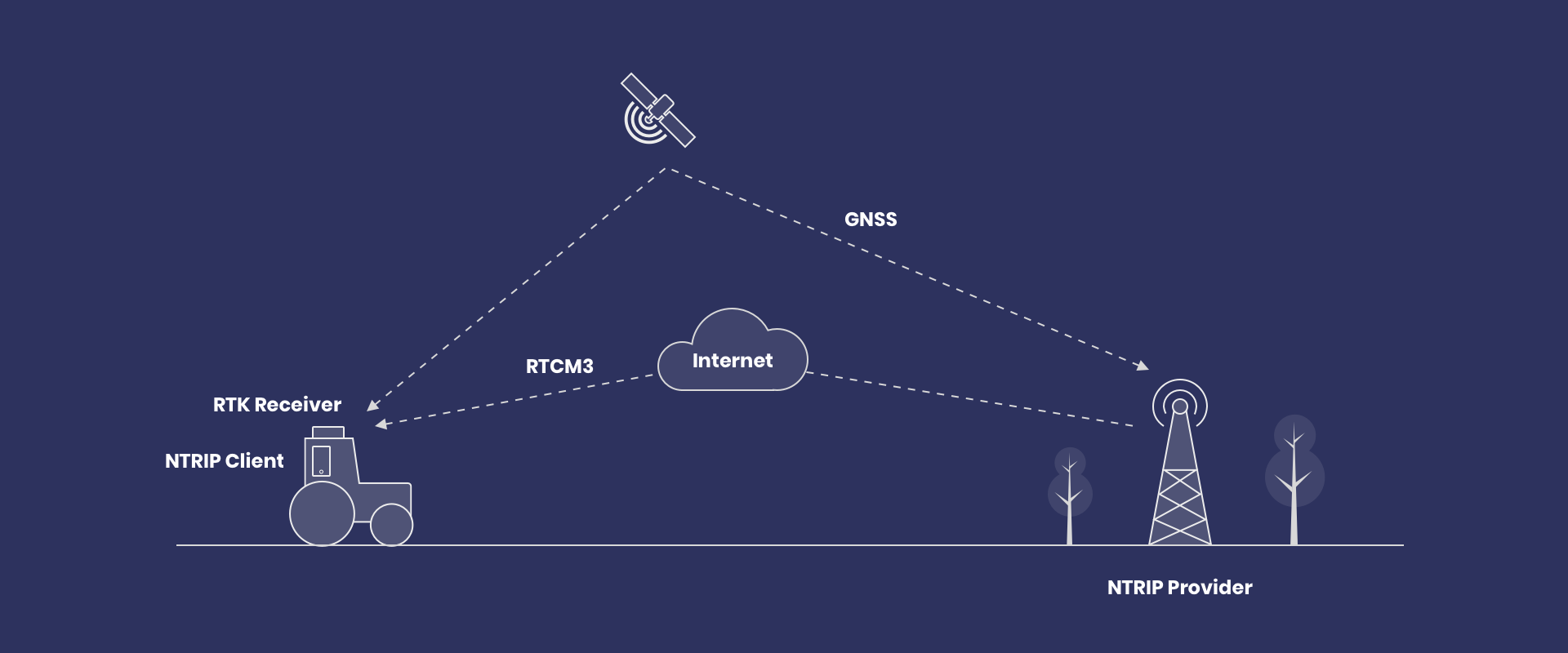
NTRIP (Networked Transport of RTCM via Internet Protocol) is a protocol for sending satellite-positioning data over the internet. Its most common job is delivering RTCM corrections to GNSS rovers: the receivers on survey poles, drones and machines that track satellite systems such as GPS and Galileo.
RTCM stands for the Radio Technical Commission for Maritime Services, the organization that publishes the standard message format for these corrections. The receiver combines them with its own satellite observations using RTK (real-time kinematic) positioning. With suitable equipment and conditions, RTK can provide centimeter-level positioning. NTRIP only delivers the data. It does not set the accuracy, and it does not replace satellite reception.
This guide explains how RTCM corrections reach GNSS rovers, what the connection settings mean, and what to check before using the resulting positions.
Table of contents
How NTRIP works
A typical correction chain has four stages:
- Source: a reference station observes satellites at a known position. NTRIP server software sends its data to a caster. A service can also supply streams produced from a network.
- Caster: the distribution point makes streams available under names called mountpoints.
- Client: software requests a mountpoint and receives the stream. It can run in a receiver or separate software connected to it.
- Receiver: the rover uses compatible RTCM corrections with its own observations to calculate its position.
BKG's NTRIP documentation explains the protocol components. For the connection requests and responses, read our NTRIP connection-flow guide.
Open RTKdata Docs
Set up an NTRIP client, pick the right mountpoint, and monitor correction age with step-by-step guides.
Why RTCM message compatibility matters
RTCM covers a family of message types, not one fixed stream. A stream set up for one receiver can use messages or satellite signals that another receiver cannot use. So “supports RTCM” is a starting point, not a complete compatibility check.
Before connecting, compare the stream details from your provider with your receiver's documentation. A mismatch can look like a working connection that never reaches a fixed solution. Our RTK guide lists the common RTCM 3 message types, and our receiver guide covers what to check on the equipment side.
What you need before connecting
- A receiver that supports the required RTK corrections and an NTRIP client.
- Internet access for that client, plus a working connection from the client to the receiver if they are separate.
- A correction source suitable for your worksite and permission to use its stream.
- The provider's host, port, mountpoint and any required login details.
For RTKdata, start with the coverage map. Check the actual work area, not just the nearest town. Mobile internet coverage and correction-service coverage are separate checks.
Start your 30-day free trial
Test pro-grade NTRIP correction streams and confirm real-time accuracy in your workflow.
How to set up an NTRIP client
Open your receiver or field application's NTRIP settings. The labels vary, but these fields have distinct jobs:
- Host: the caster's internet address. Enter the provider's hostname in the server-address field.
- Port: the connection port specified by the provider.
- Mountpoint: the name of the stream you want. It is separate from the hostname.
- Username and password: credentials for access to that stream, where required.
- GGA reporting: sends the receiver's position to the service when required. Follow the provider's instructions for enabling it.
NovAtel's NTRIP configuration guide shows how these settings work in one receiver implementation. Menu names and position-reporting requirements vary across equipment and services.
RTKdata connection example
Use eu.rtkdata.com for Europe, rtk.rtkdata.com for North America, or aus.rtkdata.com for Australia. Set the port to 2101, the mountpoint to AUTO in capitals, and enable NMEA GGA reporting.
Use the NTRIP credentials from your account, which differ from your website login. RTKdata allows one simultaneous connection per data stream; multiple active rovers need separate streams.
These are RTKdata settings, not universal NTRIP defaults. Check the maintained RTKdata quick-start guide and find your device instructions in the documentation hub.
How to check the connection and position
Work through three checks before collecting positions:
- Connection: confirm that the client connects to the selected stream. If login fails, check internet access, credentials and the mountpoint.
- Data: confirm that RTCM corrections are arriving at the receiver. Watch correction age and use the limits specified for your equipment and workflow.
- Position: check the receiver's solution status. For work requiring RTK FIX, wait for a stable fixed solution, then verify against suitable known control.
For example, Trimble recommends checking initialization by remeasuring points after a new initialization. A FIX indication alone is not an independent accuracy check.
If the connection works but the result does not, follow our NTRIP troubleshooting guide. Use the device's own status definitions rather than assuming every application displays the same labels.
What NTRIP improves, and what it cannot fix
Internet delivery avoids a direct base-to-rover radio link. Where a suitable correction service is available, it can also remove the need to operate your own base. That is useful for workflows such as surveying, mapping and agricultural guidance.
However, internet reach is not the same as RTK coverage. Distance to the reference station, obstructions, reflected satellite signals and stale corrections can still affect the result. NTRIP does not remove those limits or make an incompatible receiver compatible.
Use RTKdata's accuracy guidance to plan for the location and conditions. Avoid treating a service's coverage estimate as a guarantee for every measurement.
Test RTKdata with your receiver
Check coverage at your worksite, then use the 30-day trial to test your setup and verify results in the field.
Frequently asked questions
What is NTRIP used for?
NTRIP delivers RTCM corrections over the internet to GNSS receivers on survey rovers, drones, farm machinery and machine-guidance systems. The receiver needs internet access, through a built-in modem, a field controller or a phone hotspot. If a correction service has a base close enough to your site, you can use it instead of setting up your own.
What is the difference between NTRIP and RTK?
RTK is the positioning method. NTRIP is one way to deliver the corrections it needs; another common way is a radio link from a local base. If your receiver's correction settings ask for a host, port and mountpoint, it's using NTRIP. That doesn't necessarily mean a network: a single base can stream through a caster too.
What is the difference between NTRIP and GNSS?
GNSS is the collective name for satellite systems such as GPS, Galileo, GLONASS and BeiDou. NTRIP is the internet link that brings in correction data. RTK over NTRIP needs both a clear view of the sky and a working connection. If the connection drops, corrections stop arriving, and after a short time that depends on the receiver, it falls back to a less precise solution.
How accurate is NTRIP?
NTRIP itself adds no accuracy; it only carries the corrections. With corrections from a single base station, distance to that base is usually the biggest factor, followed by sky view, receiver quality and connection stability. RTKdata's accuracy guidance recommends working within 15 km of a base station for the best results. Our guide to accuracy and distance explains why.
Do I still need radios or my own base?
Not if a correction service has a base within range of your work area and you have reliable internet access there. Your own base still makes sense where there's no internet coverage, no service base within range, or you need full control over the base position. Our local base-station guide covers that setup.
Is NTRIP free?
The protocol is only the delivery method; what can cost money is the correction stream. Community casters such as RTK2Go are free, but no one guarantees their uptime or the accuracy of each base's position. Some government-run networks are also free, depending on the country or state. Our RTK2Go alternatives guide compares free and paid options.

Inbound and outbound sales for SMB and mid-market customers at RTKdata.